Makey Makey: Turning everyday objects into computer controls
Makey Makey is a modern invention kit that lets kids and adults turn bananas, pencils, and foil into computer inputs, blending play, coding, and curiosity in a hands-on STEM experience.
Compare prices and availability
Check current prices and availability for this guide on eBay.
As an eBay Partner, we may be compensated if you make a purchase.
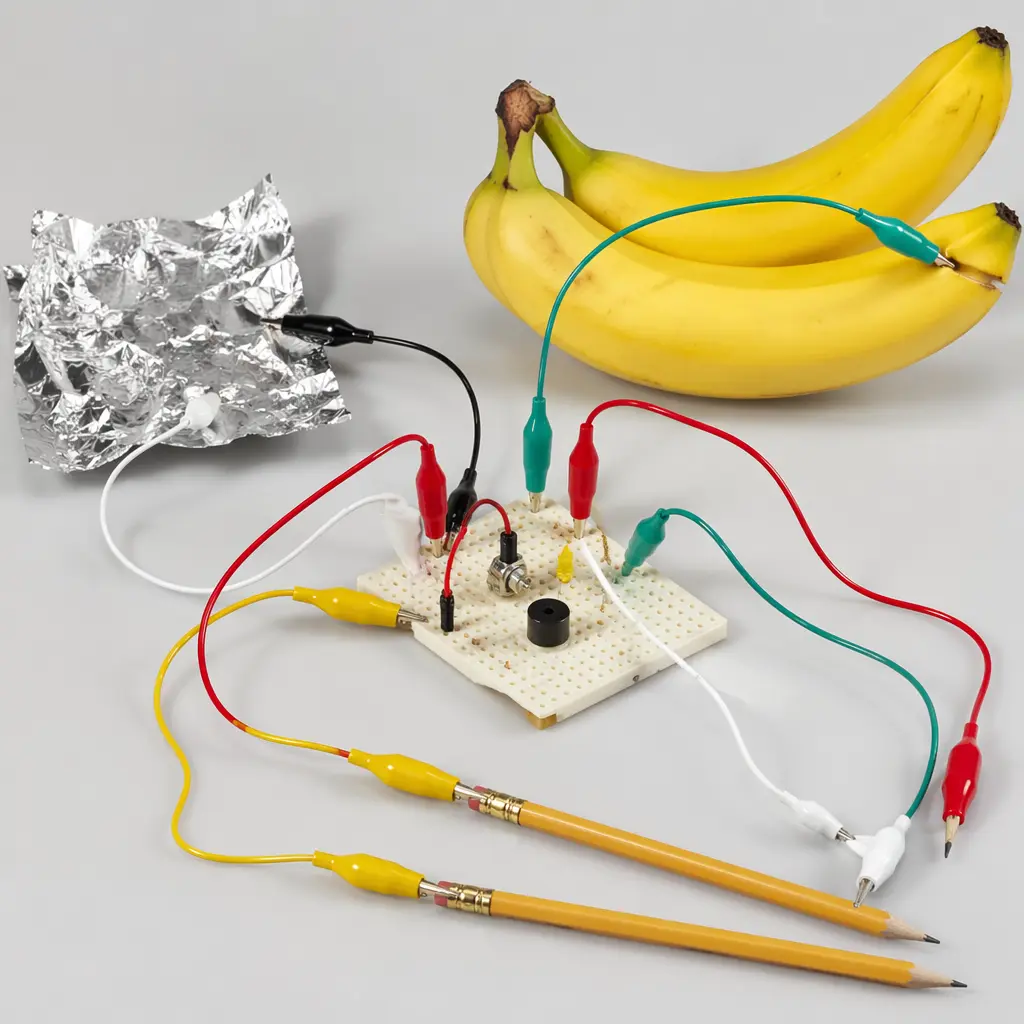
Makey Makey is one of those toys that makes adults pause and kids grin: a small invention kit that lets you control a computer using bananas, bits of foil, or anything else that conducts electricity. Plug it in, clip on a few wires, and suddenly a fruit bowl becomes a piano or a cardboard controller moves a character on screen. It sits at the crossroads of play, science, and creativity, which is exactly why it has found a lasting place in classrooms, makerspaces, and family homes.
Where it came from
Makey Makey was introduced in 2012 by a small team of inventors and researchers with backgrounds in design, engineering, and human-computer interaction. Their goal was simple but ambitious: lower the barrier to invention. Instead of starting with complex code or dense electronics theory, they wanted people to begin by touching, clipping, and playing.
The kit was originally aimed at education, particularly as a way to make abstract computing concepts tangible for kids. Early demonstrations showed children building controllers out of fruit or paper within minutes. That immediacy helped Makey Makey spread quickly through schools and workshops, and it became a familiar name during the rise of hands-on STEM and coding education in the 2010s.
Why it works
At its core, Makey Makey works by translating simple electrical signals into standard keyboard or mouse inputs. To the user, though, it feels more like magic than electronics. You connect one clip to yourself or a grounding point, another to an object, and the computer responds as if a key was pressed.
This design succeeds because it removes friction. There is no steep setup curve, and the feedback is immediate. Kids can test ideas quickly, fail safely, and iterate without fear of breaking something expensive.
- Turns everyday conductive objects into computer inputs
- Works with standard computers via simple plug-and-play
- Encourages experimentation without requiring prior coding knowledge
- Scales from quick play sessions to more complex projects
Who it's for
Makey Makey is typically recommended for school-age children and up, but its appeal spans generations. Younger kids enjoy the novelty of making silly controllers, while teens can combine it with coding platforms for more ambitious builds. Adults often find themselves just as engaged, especially those interested in DIY projects, music, or interactive art. It is one of those rare educational toys that doesn’t feel like it has an upper age limit.
Variants and what to look for today
Today, Makey Makey exists as a family of invention kits rather than a single fixed product. Modern versions generally offer more input options, sturdier boards, and better compatibility with current computers. Some sets are aimed at classrooms, while others are packaged for individual makers.
When shopping, it’s worth focusing on official-style kits that include a board, a good selection of alligator clips, and clear instructions. Very cheap imitations can work, but they often cut corners on build quality or documentation, which matters when kids are learning by trial and error. The best kits make experimentation feel inviting rather than frustrating.
Frequently asked questions
Do you need coding experience to use Makey Makey?
No. Makey Makey can be used straight out of the box as a keyboard or mouse replacement. Coding becomes useful if you want to design custom games or interactions, but it’s optional rather than required.
What kinds of objects work best?
Any object that conducts electricity can work. Fruit, coins, foil, and graphite drawings are common starting points. Part of the fun is testing unexpected items and seeing what happens.
Is it safe for kids?
Yes, when used as intended. The kit operates at very low voltages via a computer connection. Adult supervision is still recommended, especially when younger children are experimenting with household objects.
Can it be used in schools?
Makey Makey is widely used in classrooms and makerspaces. Teachers value it as a bridge between physical play and digital thinking, particularly for collaborative projects.
More than a decade after its introduction, Makey Makey still feels fresh. Its lasting appeal comes from a simple idea executed well: letting people touch and tinker their way into understanding technology. In a world of sealed screens and passive apps, that hands-on invitation remains powerful.