Bee-Bot: The classroom robot that made coding click
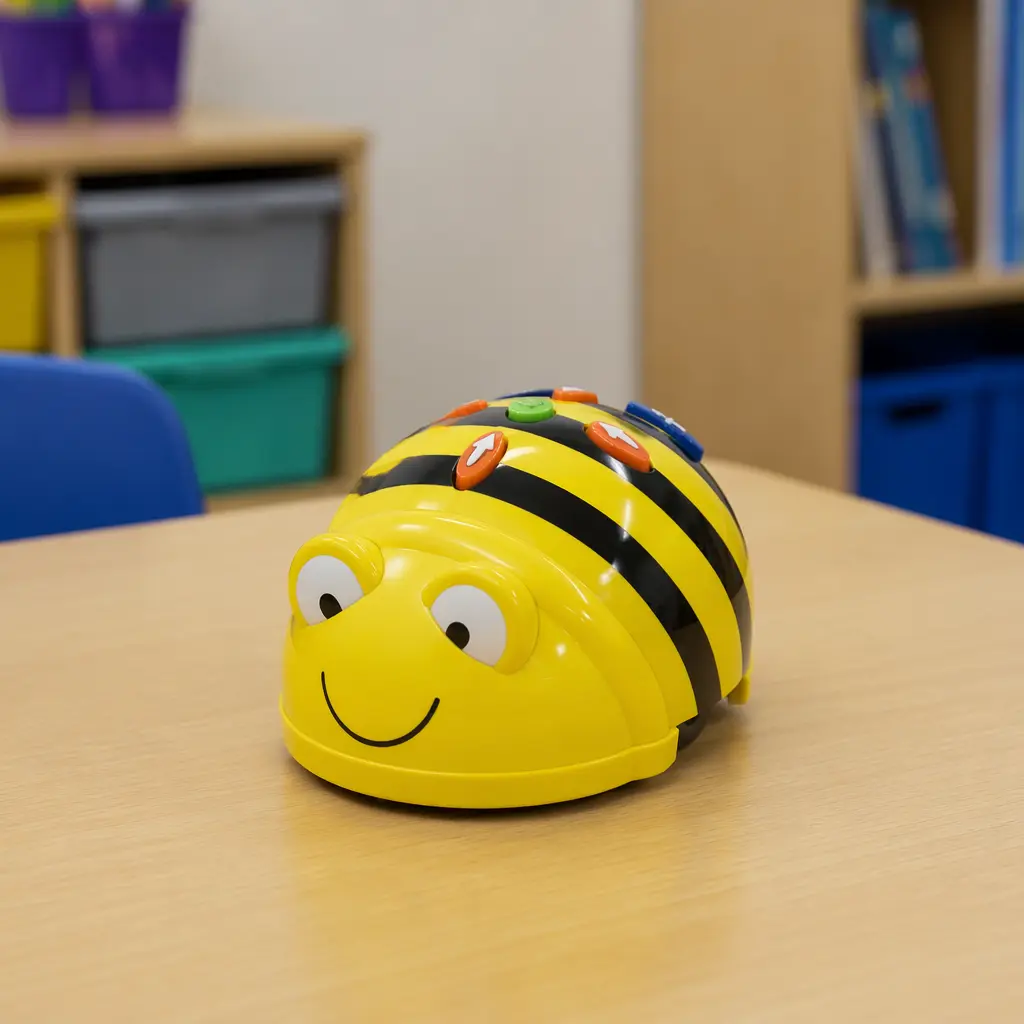
Bee-Bot is a small, friendly floor robot that helped a generation of children grasp the basics of coding through play. Since the mid‑2000s, it’s become a staple of early-years classrooms.
Compare prices and availability
Check current prices and availability for this guide on eBay.
As an eBay Partner, we may be compensated if you make a purchase.
Bee-Bot doesn’t look like a computer, and that’s the point. This cheerful, bee-shaped robot was designed to help very young children understand the basics of coding without screens, jargon, or fear. By pressing simple direction buttons and watching the robot move, kids learn that instructions have consequences — a foundational idea behind all programming.
Where it came from
Bee-Bot was introduced in 2005 by an educational technology company focused on early-years learning. At the time, most coding tools were aimed at older students and required computers, keyboards, and reading skills. Bee-Bot flipped that model by targeting children as young as nursery age, using physical movement instead of on-screen code.
Its original purpose wasn’t to teach programming languages, but to build what educators call “computational thinking”: sequencing, predicting outcomes, and debugging mistakes. By keeping the robot sturdy, friendly-looking, and easy to reset, Bee-Bot was built for real classrooms — shared, sometimes chaotic spaces where durability matters.
Why it works
The genius of Bee-Bot is that it turns abstract ideas into physical experiences. Children press a button, the robot moves. Press too many buttons, and it goes too far. Forget to clear the memory, and it repeats the old sequence. These small surprises create teachable moments without anyone needing to explain complex theory.
Key design features that make it effective include:
- Large, tactile direction buttons that don’t require reading
- Step-based movement that makes distance and sequencing visible
- On-board memory that encourages planning and correction
- A friendly, non-intimidating shape that invites handling
- Screen-free play that works in group settings
Who it’s for
Bee-Bot is primarily aimed at children aged around 3 to 7, especially in nurseries and primary schools. It works well for solo exploration but really shines in small groups, where kids take turns planning routes and predicting outcomes together. Teachers and parents often find that adults enjoy it too — not as a challenge, but as a satisfying way to see learning happen in real time.
Variants and what to look for today
Over the years, Bee-Bot has been joined by related robots and accessories designed to extend the same idea. Updated versions often include better battery life, clearer sounds, or companion apps, while still keeping the core button-based control intact.
If you’re looking for one today, focus on build quality and simplicity. The best versions feel solid, respond consistently to button presses, and are easy to reset. Many families also use themed floor mats — maps, number grids, or story scenes — to add learning variety without changing the robot itself. Be cautious with very cheap lookalikes that may have unreliable movement or confusing controls, which can undermine the learning experience.
Frequently asked questions
Does Bee-Bot require a tablet or computer?
No. Bee-Bot is designed to work entirely on its own using physical buttons. Some newer versions offer optional app connections, but they aren’t required for basic play.
Is it really teaching coding?
It doesn’t teach a programming language, but it does teach core coding concepts like sequencing, cause and effect, and debugging — skills that transfer directly to later coding experiences.
Can it be used at home, not just in schools?
Yes. While it was designed for classrooms, many parents use Bee-Bot at home, especially for shared play between siblings or parent‑child learning sessions.
What age is too young?
Children under three may enjoy watching it move but usually lack the planning skills to use it independently. Adult guidance makes a big difference at younger ages.
Two decades after its introduction, Bee-Bot remains a standout example of thoughtful educational design. By keeping technology tangible and playful, it helped redefine how early coding could be taught — not as screen time, but as hands-on problem solving that feels more like play than a lesson.